 Auditius Free audio editor and multitrack studio in your browser
AI text to speech in Spanish and English, in your browser
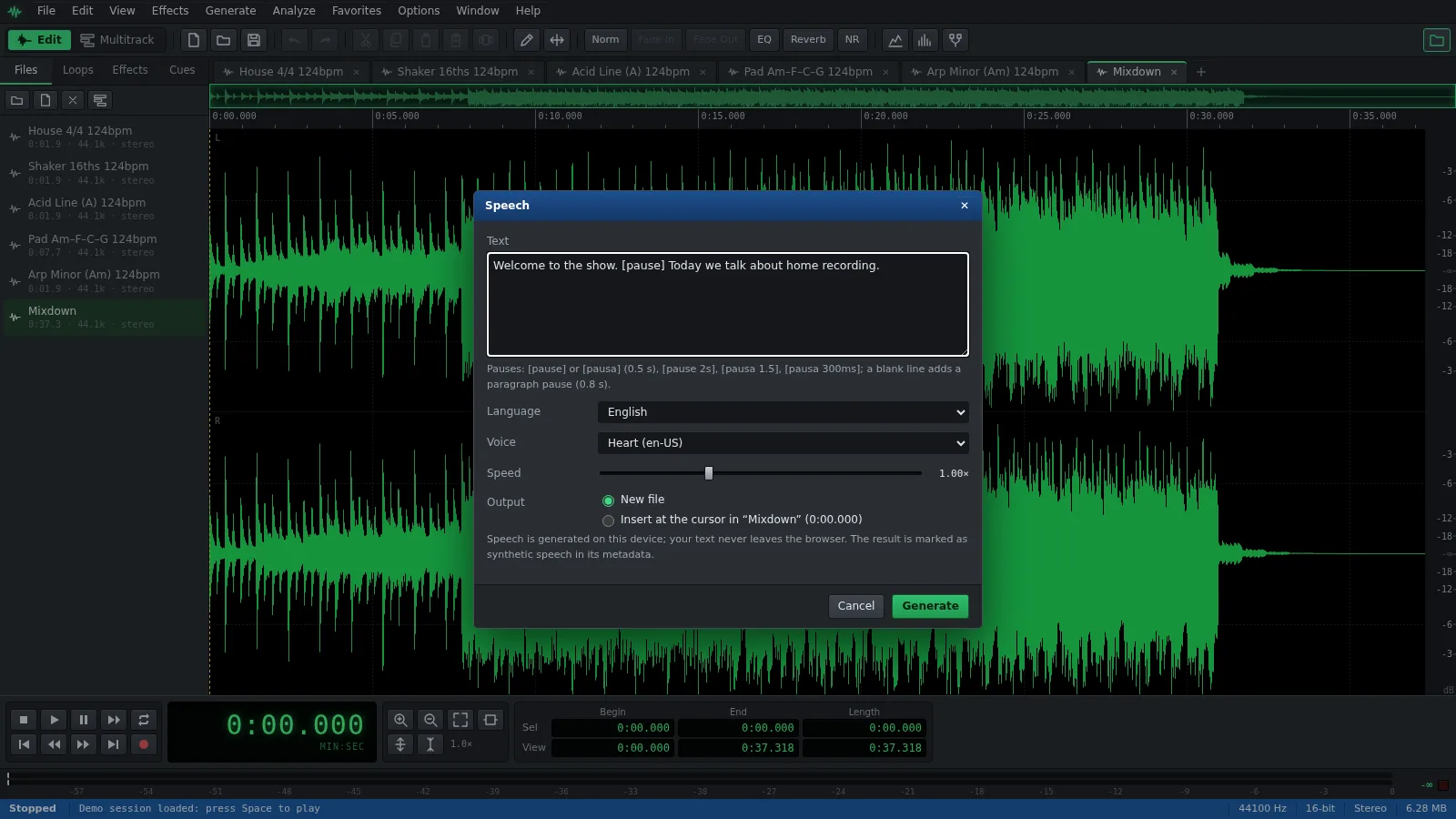
Open Auditius, choose Speech… in the Generate menu, type your text, pick a voice and click Generate. The AI voice models run on your own device after a one-time download, so your text is never uploaded. The speech opens as a new file you can edit, or goes straight into a recording at the cursor.
- Free
- No install, no account
- Files never leave your computer
- English and Spanish
How to turn text into speech, step by step
You do not need a file open: by default the speech becomes a new file.
- Click Open Auditius to generate speech.
- Open the Generate menu and choose Speech…
- Type or paste your text in Text. Add [pause] wherever you want half a second of silence.
- Set Language to Spanish or English and choose a Voice. The list groups the voices by engine and says which ones are already downloaded.
- The first time you use a voice, click Download. It stays in this browser for next time.
- Adjust Speed if you need to, from 0.5× to 2×, and leave Output on New file.
- Click Generate, listen with the Space bar and save it with File ▸ Save As… as WAV, FLAC, MP3 or Ogg Vorbis.
Which voice to choose
There are three speech engines, and each has voices for Spanish and English.
- Kokoro: natural and fast. One 96 MB download covers its seven voices: Dora, Alex and Santa in Spanish, and Heart, Bella, Michael and Fenrir in US English.
- Piper: very fast and light, one download of 28 to 64 MB per voice. davefx and carlfm speak Spanish from Spain, ald Mexican Spanish, and LJSpeech and Norman US English.
- Chatterbox: the most expressive, with an Exaggeration control instead of Speed and the option to clone a voice. It is a 963 MB download and needs WebGPU; without it, it runs on the processor at around 15 to 25 seconds per second of speech.
- The first voice you download also brings a 27 MB runtime that every model shares.
Pauses, paragraphs and where the speech goes
Pause tags work the same with every engine, in English or Spanish.
- [pause] or [pausa] adds 0.5 seconds of silence; [pause 2s], [pausa 1.5] and [pausa 300ms] set the length.
- A blank line between paragraphs adds a 0.8-second pause.
- Other words in square brackets are not read aloud: the window lists them and skips them.
- Insert at the cursor puts the speech into the active file at the cursor and pushes the rest of the audio to the right, in one step you can undo.
Cloning a voice, only with consent
With Chatterbox you can save a voice from a short recording. Open Clone a voice, use a selection of the active file or A file as Reference (5 to 10 seconds of one person speaking clearly, without music), type a Name and tick This is my voice or I have its owner’s permission. Save voice stays disabled until you do.
Cloning needs a separate 592 MB voice encoder. Saved voices stay in this browser only, and you choose them later under Speaker.
Generated speech is labeled
Every result is marked as synthetic speech in its metadata, with the engine and the voice that produced it. The note is written into WAV files, and when you insert speech into a recording, that file gets the note too.
Frequently asked questions
Which text to speech voices are there in Spanish?
Kokoro has Dora, Alex and Santa. Piper has davefx and carlfm, from Spain, and ald, from Mexico. Chatterbox has one multilingual default voice, and can also use voices you clone.
How do I add a pause in text to speech?
Write [pause] or [pausa] for half a second, or give a length such as [pause 2s] or [pausa 300ms]. A blank line between paragraphs adds 0.8 seconds.
Can I change how fast the generated voice speaks?
Kokoro and Piper voices have a Speed control from 0.5× to 2×. Chatterbox has Exaggeration instead; to change its pace afterwards, use Effects ▸ Time/Pitch ▸ Time Stretch…
Why is Chatterbox so slow at generating speech?
It is a large model that needs WebGPU; without it, it runs on the processor and is very slow. Kokoro and Piper are fast everywhere.
Is my text sent to a server to generate speech?
No. Only the voice models are downloaded, once. The speech is generated in your browser on your own device, and your text stays there.
Can I clone someone else’s voice?
Only with their permission. Before a voice is saved you must confirm that it is yours or that you have its owner’s permission, and everything made with it is marked as synthetic speech.
Audio tools
- Remove background noise from audio onlineRemove background noise from audio online for free: capture a noise profile, preview the result and export a clean file. Runs in your browser, with no uploads.
- Change the tempo of audio without changing the pitchChange the tempo of audio without changing the pitch: slow down or speed up songs, speech and loops in your browser. Free, nothing to install, and no uploads.
- Convert audio online: WAV, MP3, FLAC and OggConvert WAV to MP3 or FLAC online for free, or turn MP3, M4A and OGG into WAV. Choose bitrate or bit depth and export, all in your browser, with no uploads.
- Cut and join audio onlineCut and join audio online: trim MP3 or WAV files, remove unwanted parts and merge several recordings into one. Free, in your browser, with no uploads.
- Make loops and beats onlineMake loops online with royalty-free drum, bass and synth loops that follow your tempo. Repeat blocks, mix tracks and export WAV or MP3, free.
- Make audio louder onlineMake a quiet recording louder in your browser: boost the volume in dB, check the peaks so it does not distort and save the file. Free, and nothing is uploaded.
- Normalize audio onlineNormalize audio online for free: set the loudest peak to the level you choose, for one file or many, without clipping. Runs in your browser, with no uploads.
- Add a fade in and a fade out to audioAdd a fade in or a fade out to any song or recording in your browser: select the start or the end, pick a curve and save. Free, nothing to install, no uploads.
- Change the pitch of audio without changing the speedChange the pitch of a song or recording online for free: transpose by semitones or cents and keep the same speed and length. In your browser, with no uploads.
- Reverse audio online and play it backwardsReverse audio online for free: play a song, a voice or a sound effect backwards, or reverse only a selected part. Runs in your browser, with nothing uploaded.
- Make a ringtone from a song onlineMake a ringtone from any song online for free: pick the best 30 seconds, add fades, even out the volume and save it as an MP3. In your browser, with no uploads.
- Equalize audio online with a graphic equalizerEqualize audio online for free: boost the bass, tame harsh highs or clear up a voice with a 10-band graphic EQ, filters and presets. In your browser, no uploads.
- Compress audio online to even out the volumeFree online audio compressor: even out the loud and quiet parts of a voice, podcast or song with threshold, ratio and presets. In your browser, with no uploads.
- Add reverb to audio onlineAdd reverb to a voice, instrument or song online for free: choose a room, hall or plate preset, keep the tail and export. Runs in your browser, with no uploads.
- Record audio from your microphone onlineRecord audio from your microphone in the browser: watch the input level, record into a new or open file, play along in the multitrack and save as WAV or MP3.
- Remove clicks, pops and crackle from a recordingRemove clicks, pops and vinyl crackle from audio in your browser with the Click / Pop Eliminator. Preview the repair and save the result. Free, with no uploads.
- Fix clipped, distorted audio onlineFix clipped audio in your browser: spot the flattened peaks, rebuild them with Clip Restoration and keep the level below full scale. Free, nothing to install.
- Convert stereo audio to mono onlineConvert stereo audio to mono online for free: mix both channels with the Channel Mixer or make a true one-channel file. In your browser, with no uploads.
- Transcribe audio to text with AI, in your browserTranscribe audio to text with AI for free in your browser: word timings, click a word to hear it, SRT or VTT subtitles. Your recording is never uploaded.