 Auditius Free audio editor and multitrack studio in your browser
Fix clipped, distorted audio online
Clipping happens when a recording is louder than the maximum a file can hold: the tops of the waves are cut flat and the sound crackles or buzzes. In Auditius, Clip Restoration redraws those flattened peaks with a smooth curve, in your browser and without uploading anything.
- Free
- No install, no account
- Files never leave your computer
- English and Spanish
What clipping is and how to spot it
Digital audio has a ceiling, 0 dB at full scale. When the signal tries to go higher, the samples stop at the ceiling and every peak becomes a flat plateau. You hear it as harsh distortion on loud words, drum hits or notes.
- In the waveform, look for peaks that run into the top and bottom edges and stay there. Zoom in with View ▸ Zoom In (=) and clipped waves look cut flat instead of round.
- Analyze ▸ Statistics… shows Possibly Clipped Samples: how many samples sit at full scale in the selection or the whole file.
- During playback, the clip light at the end of the level meter turns red at full scale.
- If the file was turned down after it clipped, the plateaus sit below the edges and the counter shows zero, but the flat tops are still visible when you zoom in.
How to repair clipping, step by step
The Clip Restoration window opens as soon as your file has loaded.
- Click Open a clipped recording, or use File ▸ Open… (Ctrl+O), and choose your file.
- Select the clipped passage, or leave nothing selected to repair the whole file.
- Open Effects ▸ Noise Reduction ▸ Clip Restoration… if the window is not already open.
- Pick a preset: Hard Digital Clipping for square, flat tops, or Soft / Analog Clipping for rounder tops from an overdriven preamp or tape.
- Press Preview and compare with the original. The rebuilt peaks should sound cleaner, not louder.
- Click OK, then open Analyze ▸ Statistics… and check that Peak Amplitude is below 0 dB.
- If it is above, apply Effects ▸ Amplitude ▸ Normalize… and then save with File ▸ Save As… in the format you need.
Why the level goes down first
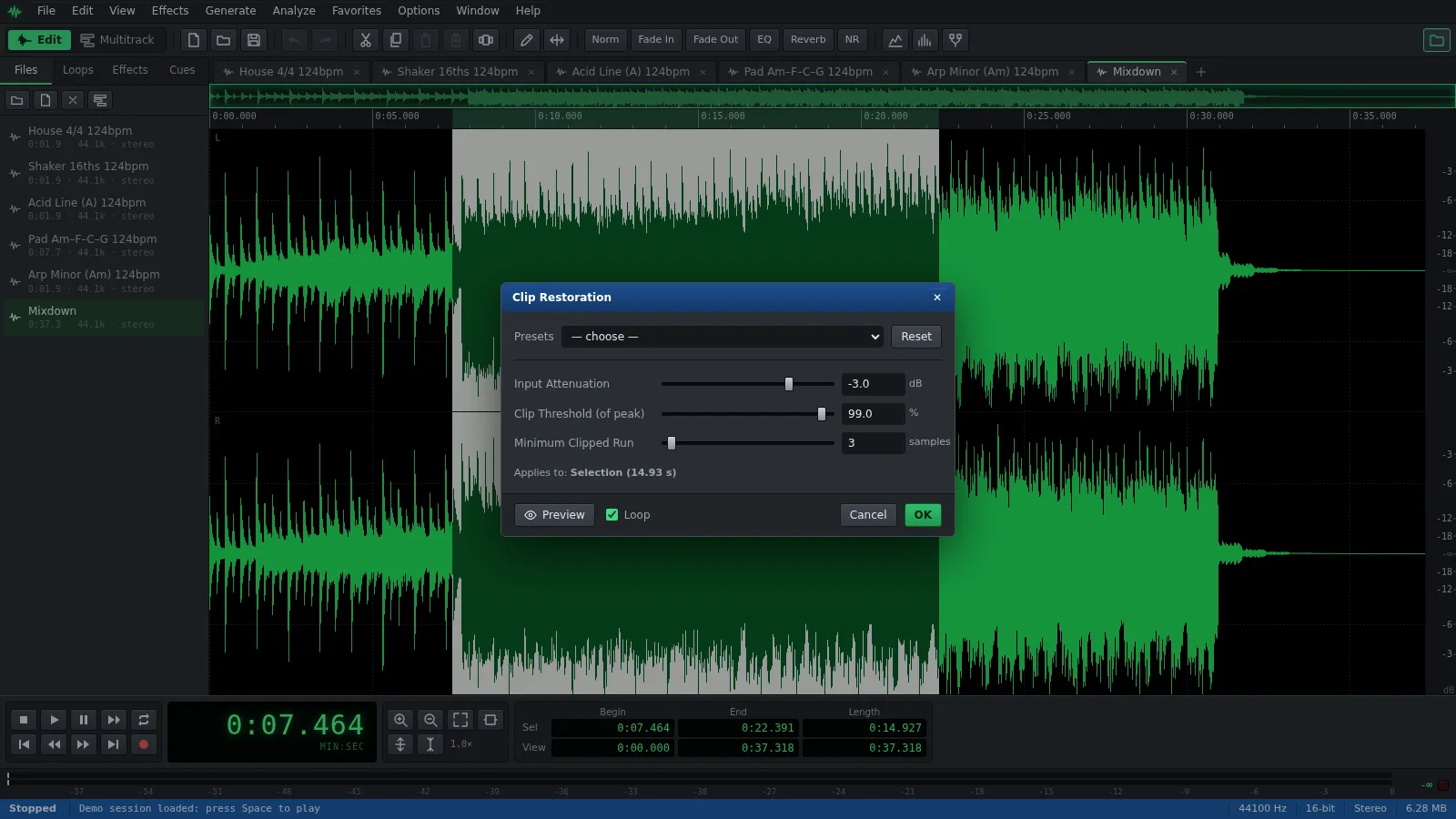
A rebuilt peak is taller than the plateau it replaces, so it needs room above the old ceiling. That is why Clip Restoration first lowers the selection by Input Attenuation, from -12 to 0 dB and -3 dB by default, and only then redraws the peaks. Each plateau then becomes a smooth curve that follows the slope of the good samples on either side.
- Input Attenuation: -3 dB suits light clipping. For heavy clipping, try -6 dB or more. The No Attenuation preset keeps the level, so the rebuilt peaks go over full scale until you lower them with Normalize.
- Clip Threshold (of peak), from 80 to 100%: how close to the loudest sample of the selection a sample must be to count as clipped. Around 99% fits hard clipping and 95% soft clipping. Since it is measured against the loudest sample, select passages that really clip.
- Minimum Clipped Run, from 2 to 32 samples: how many samples in a row must sit at that level. Higher values ignore short natural peaks; lower values catch brief clips.
What Clip Restoration can and cannot recover
It works best on short, occasional clipping: a few samples flattened on the loudest syllables or drum hits. There, the curve it draws is close to the wave that was lost.
It cannot bring back what was never recorded. When long stretches are flat, the curve is only an educated guess, and audio that was clipped and then compressed, limited or saved as MP3 no longer has clean flat tops to detect. It can soften the harshness, but recording again at a lower level is the only real fix.
Frequently asked questions
Can clipped audio be fixed completely?
Light clipping, almost. Heavy clipping can only be improved: the effect estimates the shape of the lost peaks, and the more samples are missing, the rougher that estimate.
Should I lower the volume before fixing clipping?
Not by hand. Turning a clipped file down keeps the flat tops, and Clip Restoration already lowers the level with Input Attenuation before rebuilding them. Afterwards, check Peak Amplitude and normalize if it is above 0 dB.
Why does my audio still sound distorted after Clip Restoration?
The distortion may come from earlier in the chain, such as an overdriven preamp, or from clipping that was later compressed or converted to MP3. Try the Soft / Analog Clipping preset or a lower Clip Threshold (of peak), and preview the result.
Does Normalize fix clipped audio?
No. Effects ▸ Amplitude ▸ Normalize… only turns the whole selection up or down, so the flattened peaks keep their shape. Use it after Clip Restoration to bring the rebuilt peaks under 0 dB.
Audio tools
- Remove background noise from audio onlineRemove background noise from audio online for free: capture a noise profile, preview the result and export a clean file. Runs in your browser, with no uploads.
- Change the tempo of audio without changing the pitchChange the tempo of audio without changing the pitch: slow down or speed up songs, speech and loops in your browser. Free, nothing to install, and no uploads.
- Convert audio online: WAV, MP3, FLAC and OggConvert WAV to MP3 or FLAC online for free, or turn MP3, M4A and OGG into WAV. Choose bitrate or bit depth and export, all in your browser, with no uploads.
- Cut and join audio onlineCut and join audio online: trim MP3 or WAV files, remove unwanted parts and merge several recordings into one. Free, in your browser, with no uploads.
- Make loops and beats onlineMake loops online with royalty-free drum, bass and synth loops that follow your tempo. Repeat blocks, mix tracks and export WAV or MP3, free.
- Make audio louder onlineMake a quiet recording louder in your browser: boost the volume in dB, check the peaks so it does not distort and save the file. Free, and nothing is uploaded.
- Normalize audio onlineNormalize audio online for free: set the loudest peak to the level you choose, for one file or many, without clipping. Runs in your browser, with no uploads.
- Add a fade in and a fade out to audioAdd a fade in or a fade out to any song or recording in your browser: select the start or the end, pick a curve and save. Free, nothing to install, no uploads.
- Change the pitch of audio without changing the speedChange the pitch of a song or recording online for free: transpose by semitones or cents and keep the same speed and length. In your browser, with no uploads.
- Reverse audio online and play it backwardsReverse audio online for free: play a song, a voice or a sound effect backwards, or reverse only a selected part. Runs in your browser, with nothing uploaded.
- Make a ringtone from a song onlineMake a ringtone from any song online for free: pick the best 30 seconds, add fades, even out the volume and save it as an MP3. In your browser, with no uploads.
- Equalize audio online with a graphic equalizerEqualize audio online for free: boost the bass, tame harsh highs or clear up a voice with a 10-band graphic EQ, filters and presets. In your browser, no uploads.
- Compress audio online to even out the volumeFree online audio compressor: even out the loud and quiet parts of a voice, podcast or song with threshold, ratio and presets. In your browser, with no uploads.
- Add reverb to audio onlineAdd reverb to a voice, instrument or song online for free: choose a room, hall or plate preset, keep the tail and export. Runs in your browser, with no uploads.
- Record audio from your microphone onlineRecord audio from your microphone in the browser: watch the input level, record into a new or open file, play along in the multitrack and save as WAV or MP3.
- Remove clicks, pops and crackle from a recordingRemove clicks, pops and vinyl crackle from audio in your browser with the Click / Pop Eliminator. Preview the repair and save the result. Free, with no uploads.
- Convert stereo audio to mono onlineConvert stereo audio to mono online for free: mix both channels with the Channel Mixer or make a true one-channel file. In your browser, with no uploads.
- Transcribe audio to text with AI, in your browserTranscribe audio to text with AI for free in your browser: word timings, click a word to hear it, SRT or VTT subtitles. Your recording is never uploaded.
- AI text to speech in Spanish and English, in your browserTurn text into speech with AI for free in your browser: Spanish and English voices, adjustable speed, pause tags and WAV export. Your text stays on your device.