 Auditius Free audio editor and multitrack studio in your browser
Separate the vocals from a song with AI
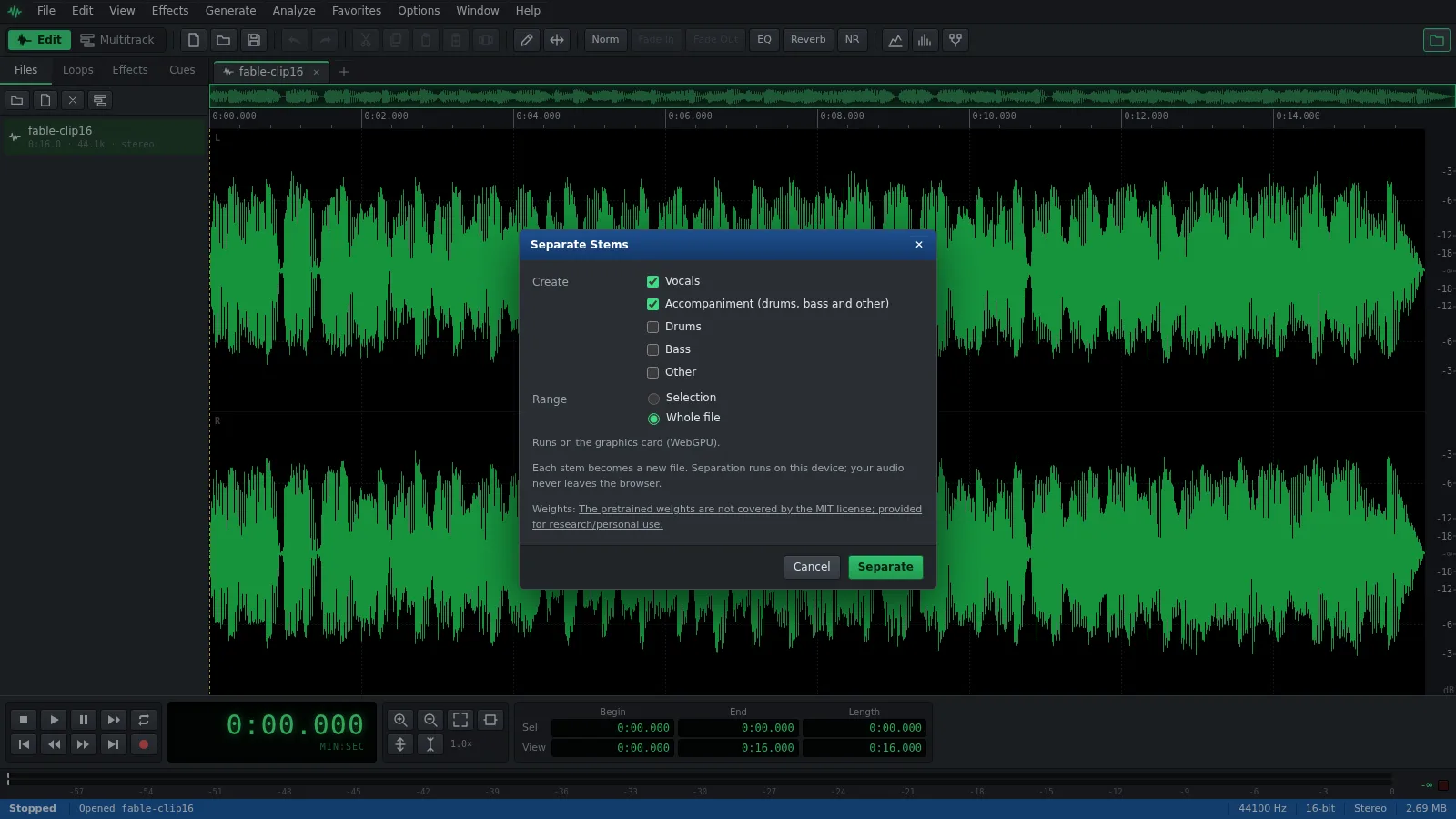
Open your song and choose Effects ▸ Separate Stems…. Auditius runs Demucs, an AI source separation model, on your own computer and gives you the vocals and the accompaniment as new files, ready to play, edit or save. You download the model once, when you ask for it, and the song never leaves your computer.
- Free
- No install, no account
- Files never leave your computer
- English and Spanish
How to separate the vocals from a song
The first time, the Separate Stems window offers to download the model. After that it is stored in your browser and loads from there.
- Click Open a song to separate, or use File ▸ Open… (Ctrl+O), and choose your song.
- To separate only part of it, select that part first; otherwise the whole file is used.
- Choose Effects ▸ Separate Stems… from the menu bar.
- If the window shows a Download button, click it once. The download is about 198 MB.
- Tick what you want: Vocals and Accompaniment (drums, bass and other) are ticked by default; Drums, Bass and Other are there too.
- Click Separate and wait. A progress bar shows how far it has got, and Cancel stops it.
- Each part appears as a new file, such as “My song (Vocals)”. Play it, edit it, or save it with File ▸ Save As… as WAV, FLAC, MP3 or Ogg.
What you get
The model splits a song into four parts: vocals, drums, bass and everything else. Auditius turns them into the files you ticked.
- Vocals: the voice on its own, for an a cappella, a remix or to study a melody.
- Accompaniment: drums, bass and other mixed together, which is the song without vocals. Use it as a karaoke track or to sing over.
- Drums, Bass and Other: each part on its own, to practise an instrument or rebuild the mix in the Multitrack view.
- The new files keep the sample rate and length of the original, so they line up exactly if you put them back together.
How long it takes
Separation is heavy work. With a graphics card that the browser can use through WebGPU it is much faster; without one it runs on the processor, and a song takes roughly three times its own length, around ten minutes for a three and a half minute song. The window tells you which of the two it will use.
It needs a few gigabytes of free memory while it works. To try it quickly, select thirty seconds of the song first and separate only that.
Tips for a cleaner result
Separation is never perfect: a little of the music can stay in the vocals and the other way round.
- Start from the best file you have. A WAV or a high bitrate MP3 separates better than a low quality one.
- Clean up what is left with the usual tools: Noise Gate or Envelope on the vocals, or a little EQ on the accompaniment.
- Effects ▸ Amplitude ▸ Channel Mixer… has a Vocal Cut (center) preset that removes what sits in the middle of a stereo mix. It is instant but rough; Separate Stems is the one to use when quality matters.
Frequently asked questions
Is my song uploaded to separate the vocals?
No. The model runs in your browser, on your own computer. Only the model itself is downloaded, once, and your audio never leaves the device.
Can I make a karaoke version of a song?
Yes. Tick only Accompaniment (drums, bass and other) and you get the song without the vocals, ready to save as MP3.
Why is vocal separation slow on my computer?
Without a graphics card available to the browser, the model runs on the processor. It still works, but a whole song takes several minutes. Separating a shorter selection is quicker.
Can I use the separated vocals in my own releases?
That depends on the song, not on Auditius: you need the rights to it. Also note that the Demucs model weights are offered for research and personal use, as the models window explains.
Which AI model separates the vocals?
Demucs (htdemucs), a source separation model by Meta that splits music into vocals, drums, bass and other. Auditius runs it with ONNX Runtime in the browser.
Audio tools
- Remove background noise from audio onlineRemove background noise from audio online for free: capture a noise profile, preview the result and export a clean file. Runs in your browser, with no uploads.
- Change the tempo of audio without changing the pitchChange the tempo of audio without changing the pitch: slow down or speed up songs, speech and loops in your browser. Free, nothing to install, and no uploads.
- Convert audio online: WAV, MP3, FLAC and OggConvert WAV to MP3 or FLAC online for free, or turn MP3, M4A and OGG into WAV. Choose bitrate or bit depth and export, all in your browser, with no uploads.
- Cut and join audio onlineCut and join audio online: trim MP3 or WAV files, remove unwanted parts and merge several recordings into one. Free, in your browser, with no uploads.
- Make loops and beats onlineMake loops online with royalty-free drum, bass and synth loops that follow your tempo. Repeat blocks, mix tracks and export WAV or MP3, free.
- Make audio louder onlineMake a quiet recording louder in your browser: boost the volume in dB, check the peaks so it does not distort and save the file. Free, and nothing is uploaded.
- Normalize audio onlineNormalize audio online for free: set the loudest peak to the level you choose, for one file or many, without clipping. Runs in your browser, with no uploads.
- Add a fade in and a fade out to audioAdd a fade in or a fade out to any song or recording in your browser: select the start or the end, pick a curve and save. Free, nothing to install, no uploads.
- Change the pitch of audio without changing the speedChange the pitch of a song or recording online for free: transpose by semitones or cents and keep the same speed and length. In your browser, with no uploads.
- Reverse audio online and play it backwardsReverse audio online for free: play a song, a voice or a sound effect backwards, or reverse only a selected part. Runs in your browser, with nothing uploaded.
- Make a ringtone from a song onlineMake a ringtone from any song online for free: pick the best 30 seconds, add fades, even out the volume and save it as an MP3. In your browser, with no uploads.
- Equalize audio online with a graphic equalizerEqualize audio online for free: boost the bass, tame harsh highs or clear up a voice with a 10-band graphic EQ, filters and presets. In your browser, no uploads.
- Compress audio online to even out the volumeFree online audio compressor: even out the loud and quiet parts of a voice, podcast or song with threshold, ratio and presets. In your browser, with no uploads.
- Add reverb to audio onlineAdd reverb to a voice, instrument or song online for free: choose a room, hall or plate preset, keep the tail and export. Runs in your browser, with no uploads.
- Record audio from your microphone onlineRecord audio from your microphone in the browser: watch the input level, record into a new or open file, play along in the multitrack and save as WAV or MP3.
- Remove clicks, pops and crackle from a recordingRemove clicks, pops and vinyl crackle from audio in your browser with the Click / Pop Eliminator. Preview the repair and save the result. Free, with no uploads.
- Fix clipped, distorted audio onlineFix clipped audio in your browser: spot the flattened peaks, rebuild them with Clip Restoration and keep the level below full scale. Free, nothing to install.
- Convert stereo audio to mono onlineConvert stereo audio to mono online for free: mix both channels with the Channel Mixer or make a true one-channel file. In your browser, with no uploads.
- Transcribe audio to text with AI, in your browserTranscribe audio to text with AI for free in your browser: word timings, click a word to hear it, SRT or VTT subtitles. Your recording is never uploaded.
- AI text to speech in Spanish and English, in your browserTurn text into speech with AI for free in your browser: Spanish and English voices, adjustable speed, pause tags and WAV export. Your text stays on your device.